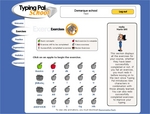
Typing Tournament equips children (and adults) with the typing skills essential for daily living. This flexible keyboarding package teaches beginners, strengthens the competent and challenges the advanced (and it's loads of fun!)
Users begin a Medieval quest at the 'Alpine Peaks' and journey through 16 cool environments, building typing skills as they go. Each landmark introduces 4 new keys and includes a animated lesson, 3 action-packed typing games and lastly, a typing test to measure progress.
There are drill and practice incentives, things to collect, printable certificates and rewards at the end. It's a great way to master an essential real-world skill!
Are You Eligible? Most products are available to everyone at our normal great prices.
However, products with "Proof of Academic Affiliation Required" are only available to teachers, students, schools, and school employees and require you to verify your academic eligibility.
To purchase Academic product - Add the product(s) to your shopping cart and proceed to checkout.
THEN, after checking out, you may upload your Academic Affiliation when the website requests it, or you may email or fax us a picture of your school photo ID card. A valid ID contains your name, your picture, your school's name, and current enrollment dates. Be sure to include your order number with any communication.
If you are a school teacher or employee, please include a picture ID or other valid ID information on school letterhead.
16 separate sets of challenging, informative and entertaining lesson content•Games, drills and tests fully integrated with the Focus Content for every lesson
Lessons and drills combine keys in a variety of ways including Home Row paths, vertical keypaths and common English letter strings
Step-by-step explanation and demo of all content such as Spaces, Capitals
Color-coded keyboard to highlight finger patterns; animated demos for new keys; animated visual prompts in lessons and drills
Drills that strengthen muscle memory and finger movement patterns
Printable Typing Certificates to display user achievements
Printable Test Results report to analyze user performance
At any time, students can skip past any lesson they feel they've mastered, as long as they successfully pass the Area's Test.
Teacher & Administrator Tools
Administrative Area for teachers to create and manage Classes
Class and individual User Settings can be accessed and changed
Individual student reporting provides detailed progress data
Available in Network version for easy installation and management across School