
TechnoKids TechnoBookmaking


Description
Integrate Language Arts with Technology in the Classroom
Integrate technology in the classroom by teaching fun writing activities to elementary students. In the TechnoBookmaking course, students write, edit, and illustrate books. They use inspiring templates to publish a collection of stories. Each activity teaches a new word processing skill. Lessons explain how to make a tiny picture book, flip flap story, unfolding riddle book, layer book of facts, bookmarks, and greeting card. Place the publications on a bookshelf or hold a Young Authors’ Conference. Extension activities include additional templates that offer unlimited creativity. Put a fresh twist on how Microsoft PowerPoint or Google Slides can be used in language arts. Explore the possibilities with bookmaking.
Fun Writing Activities for Grades 1-3
Motivate reluctant writers. Have children ages 6-8 become authors and illustrators of fiction and non-fiction books.
Blend Word Processing and Writing Skills
Lessons support students throughout the writing process. They organize their ideas, express their thoughts, and edit the text. This improves spelling, grammar, and sentence structure. They also learn how to format text and arrange objects.
Teach a Cross-Curricular Unit
Integrate technology into curriculum units. The lessons in TechnoBookmaking are adaptable. Use the book templates as part of a language arts or social studies unit. For example, students can write an original story about their family, five senses, seasons, animal habitats, or community helpers. The learning opportunities are endless!
Develop a Positive Attitude Towards Books
Bookmaking offers many benefits to students. It increases writing skills, boosts reading skills, and sparks creativity. Plus, it can personalize learning by allowing students to express their unique ideas.
Celebrate Learning
Display the books in the classroom or library to provide an authentic audience. Or have students take part in a book exchange, reading circle, or book buddies program. The unique writing activities in the TechnoBookmaking course support young authors.
TechnoKids TechnoBookmaking
- Publisher: TechnoKids
- Grade Level: 1-3
- Platform: Win
- Item #: PRI-BOOKMAKING
We will honor all current TechnoKids promotions!
| Starter account. Includes online teacher 12 mths #PRI-BOOKMAKING |
Price: $49.00 | |
| Class account: Teacher plus up 40 students 12 mths #PRI-BOOKMAKINGC |
Price: $109.00 |
Features and Benefits
Assignment 1 Make a Tiny Picture Book
Publish a mini wordless picture book using an accordion style template and images.
Assignment 2 Create a Flip Flap Book
Write and illustrate a story using a template that reveals a hidden object behind a flap.
Assignment 3 Make a Folding Riddle
Book Devise clues to create a riddle book using a template with tabs that unfold to display the answer.
Assignment 4 Design a Layer Book of Facts
Summarize facts using a template that includes layered headings to classify information.
Assignment 5 Craft Bookmarks
Express a love of reading by adjusting the object order of text and images to design bookmarks.
Assignment 6 Send an Invitation or Greeting Card
Design an invitation to a book sharing event or make a thank you card for an author.
Assignment 7 Share Books
Celebrate authorship. Start a book club, lead a bookmaking workshop, or exchange stories.
Integrate Technology in the Classroom
Optional Word Processing and Language Arts Activities
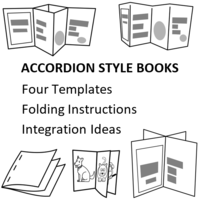
- Discover Accordion Style Books: Use templates and folding techniques to make books.
- Make Flip Flap Books: Make a story with a hidden item below a flap. Book ideas included.
- Write a Story That Unfolds: Create a story with pages that unfold to show a surprise ending.
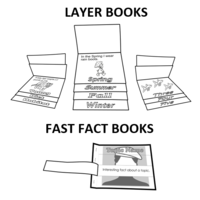
- Build Fast Fact Books: Make a book with strips that peel away to show facts.
- Publish Story Books: Write a story using a template. Activity includes story starter ideas.
- Get Story Ideas: Use a story generator to pick a character, setting, and plot.
- Plan a Story: Organize ideas using a planner to sketch the beginning, middle, and end.
Videos
System Requirements
| Ages | 6, 7, 8, 9, 10, 11, 12 |
|---|---|
| Grades | grade 1, grade 2, grade 3, grade 4, grade 5, grade 6 |
| Program | Slides, PowerPoint |
| Tech Integration | geography, health, history, language arts, science, social studies |
| Tech Skill | presentation, word processing |
| License | Homeschooling, Starter, Class, Classrooms, School |
| Starter License Includes | online teacher guide, online student workbook, get started, course slides, printable assessment tools, sample files, templates, extension activities, certificates, parent letters |
| Class License Includes | online teacher guide, getting started tips, course calendar, online student workbook, online assignments, printable assessment tools, online quizzes, student reporting, sample files, extension activities, certificates, parent letters, templates |
| Classroom License Includes | online teacher guide, getting started tips, course calendar, class management tools, online student workbook, online assignments, printable assessment tools, online quizzes, student reporting, sample files, extension activities, certificates, parent letters, templates |
| Product Type | Course |
| Homeschool License Includes | Certificates, Extension activities, Online assignments, Online quizzes, Online teacher guide, Parent letters, Remove printable assessment tools, Sample files, Student reporting, Templates |