Technokids TechnoFuture AI


Description
Technokids TechnoFuture AI
- Publisher: TechnoKids
- Grade Level: 6-9
- Platform: Win
- Item #: INT-Future AI
We will honor all current TechnoKids promotions!
| Starter account. Includes online teacher 12 mths #INT-TECHNOAI |
Price: $69.00 | |
| Class account: Teacher plus up 40 students 12 mths #INT-TECHNOAIC |
Price: $109.00 |
Features and Benefits
Session 1: Become a Futurist
In this session, students take on the role of futurists, imagining tomorrow. They begin by exploring artificial intelligence and discovering how it is already part of their everyday lives. Then they watch a future-themed video that brings the possibilities to life. Using an AI-powered research tool, students investigate emerging innovations and record their discoveries. Finally, they team up with classmates to build a bubble map packed with creative inventions for homes, schools, and workplaces of the future.
Session 2: Illustrate the Home of the Future
In this session, students kick off their 'Choose Your Own Adventure' sci-fi story by inventing a futuristic gadget designed to help teens get ready for school. They begin by imagining the purpose, appearance, and user interface of the device. Then, they bring their invention to life using an AI Image Generator, crafting visual representations through descriptive text prompts. After creating their gadget, students write the opening scene of their story, which starts with the reader waking up in a high-tech home of the future. An optional extension activity has students explore ethics related to the use of AI-generated artwork.
Session 3: Model Futuristic Transportation
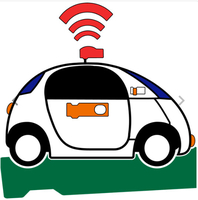
In this session, students offer readers two unique ways to travel to school. They start by designing a futuristic vehicle such as a hover scooter or teleporting bubble based upon an image found online that has a Creative Commons license. Using a 3D AI modeling tool, they transform the flat image into a 3D object. Next, they create a slide that illustrates the journey from home to school using their invention. During a gallery walk, classmates explore each other's creations and select a second futuristic vehicle to include in their story. By sharing 3D models and slide content, students give readers engaging, imaginative choices. As an optional extension, students explore AI cybersecurity systems that could protect school data.
Session 4: Code a Virtual Tutor
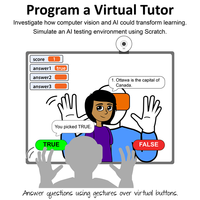
In this session, students imagine schools in the future. They investigate how computer vision and artificial intelligence could transform learning. Next, students design a school day itinerary and incorporate it into their story, featuring high-tech activities. To simulate an AI-powered testing environment, students use Scratch to create a True or False quiz. The program allows users to respond by swiping their hands over virtual buttons, mimicking gesture-based input. The quiz provides real-time feedback by automatically checking answers and displaying results. Once complete, students add a link to the quiz in their interactive itinerary so readers can take the test as part of the story. As an optional extension, students can watch a TED Talk on extended reality or create an animated 3D population map, generated with the help of AI tools.
Session 5: Envision the Future of Fun and Work
In this session, students finish their story. As the school day ends, the reader faces another choice: head to work or join friends. For the 'Work in the Future' path, students design a graphic that outlines a futuristic task list. For the 'Entertainment in the Future' path, students use a Generative AI tool to create an original background song that captures the scene's mood. Once both options are complete, students write an ending. As an optional extension, students can analyze a TED Talk on AI and creativity.
Session 6: Imagine Tomorrow
In this session, students unveil their imaginative, futuristic worlds to readers. They begin by testing the story’s flow, ensuring that each choice leads to the correct slide. Next, they enhance the storytelling experience by applying advanced animation techniques. Once their interactive story is complete, students share their 'Choose Your Own Adventure'. They then read a classmate’s sci-fi story and leave a comment highlighting their favorite part. To wrap up the course, students reflect on their creative journey.
Fun Artificial Intelligence Activities for Kids
- History of Artificial Intelligence: Complete the timeline using an AI tool.
- Risks of Artificial Intelligence: Consult an AI expert about risks.
- Ethics of AI Artwork: Examine creative licensing.
- Cybersecurity in the Future: Explore AI privacy and safety issues.
- Code a Virtual Pet: Program with Scratch blocks to create a futuristic pet.
- Generate a 3D Map: Animate population data using Excel.
- Improve Accessibility: Use the Accessibility Checker.
Videos
System Requirements
| Ages | 13, 14, 15, 16, 17, 18 |
|---|---|
| Ages Category | 13+ |
| Age Scope Sequence | 13-15 |
| Grades | grade 8, grade 9, grade 10, grade 11, grade 12 |
| Grade Scope Sequence | 8 to 10 |
| Program | Excel, PowerPoint, Word, Scratch |
| Tech Integration | computer science, language arts, science |
| Tech Skill | artificial intelligence, coding, presentation, spreadsheet, word processing |
| License | Homeschooling, Starter, Class, Classrooms |
| Starter License Includes | online teacher guide, get started, course slides, printable assessment tools, sample files, templates, extension activities, certificates, parent letters, online student workbook |
| Class License Includes | online teacher guide, getting started tips, course calendar, online student workbook, online assignments, printable assessment tools, online quizzes, student reporting, sample files, extension activities, certificates, parent letters, templates |
| Classroom License Includes | online teacher guide, getting started tips, course calendar, class management tools, online student workbook, online assignments, printable assessment tools, online quizzes, student reporting, sample files, extension activities, certificates, parent letters, templates |
| Product Type | Course |
| Homeschool License Includes | Certificates, Extension activities, Online assignments, Online quizzes, Online teacher guide, Parent letters, Remove printable assessment tools, Sample files, Student reporting, Templates |