TechnoKids TechnoPainter

Description
Digital Art for Kids
Hook young artists with a digital art for kids course. In TechnoPainter, primary students become “techno” painters. They produce beautiful artwork as they explore digital paint tools using Paint. They experiment with brush styles and create geometric designs using shape outlines and fills. By applying their artistic talents, students earn an Awesome Artist certificate.
Spark Creativity in Your Students
Students explore their inner artist using technology. Inspire young painters ages 6-8 to try out new tools, create original eye-catching masterpieces, and build self-confidence.
Complete Resources for Teachers of Grades 1-3
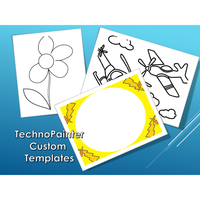
Everything you need to teach an engaging and unique curriculum unit is provided. TechnoPainter includes templates and samples to assist and inspire young learners. The Teacher Guide describes helpful teaching strategies, lesson plans, learning objectives, and how-to instructions. Additional resources for the course include: review activities, optional extension challenges, sample files, award certificate, and templates. Unleash the creative power of students with digital art painting!
Blend Technology and Visual Arts Curriculum
Integrate computers with creative arts, while developing fundamental technology skills. Assessment tools help teachers to evaluate student progress. A complete Summary of Skills checklist records all the graphic, word processing, and content knowledge mastered by each child. In addition, students complete a fun paint skills checklist to reflect on their knowledge and growth.
TechnoKids TechnoPainter
- Publisher: TechnoKids
- Grade Level: 1-2
- Platform: Win
- Item #: PRI-PAINTER
We will honor all current TechnoKids promotions!
| Starter account. Includes online teacher 12 mths #PRI-PAINTER |
Price: $49.00 | |
| Class account: Teacher plus up 40 students 12 mths #PRI-PAINTERC |
Price: $109.00 |
Features and Benefits
Assignment 1 Become a Painter
Explore the program window. Form a connection between traditional and digital art tools.
Assignment 2 Pencil It
Develop fine motor skills. Learn how to draw freehand using a digital pencil.
Assignment 3 Fill It
Color objects with the paint bucket. Troubleshoot to fix drawings that cannot be filled.
Assignment 4 Design It
Make a coloring book page using a digital pencil. Trade pictures with a friend to color the picture.
Assignment 5 Keyboard It
Identify common keys on the keyboard such as the SHIFT key, BACKSPACE key, and spacebar.
Assignment 6 Try It
Discover the function and location of keys on the keyboard. Format font, font size, and font style.
Assignment 7 Name and Print It
Practice basic keyboard skills. Produce a picture using student name as the subject matter.
Assignment 8 Brush It
Experiment with different types of brushes to understand the effect of each style.
Assignment 9 Rainbow It
Gain confidence with using digital art tools including a brush, calligraphy pen, crayon, or marker.
Assignment 10 Smile It
Illustrate a happy scene. Magnify the canvas to add details.
Assignment 11 Explore It
Outline and fill colorful shapes. Adjust the size and position of objects.
Assignment 12 Stamp It
Create a unique pattern by formatting shapes and arranging them on the canvas.
Assignment 13 Study It
Spark inspiration by examining a collection of picture frames.
Assignment 14 Decorate and Save It
Apply artistic talents to paint a frame with an attractive pattern. Save the file.
Assignment 15 Picture It
Open the saved frame. Craft an original piece of art.
Assignment 16 Award It
Celebrate success with an Awesome Artist award.
Optional Digital Art Projects for Kids
- Color It: Fill the picture with color.
- Finish It: Follow directions to complete the painting.
- Magnify It: Use the magnifier to edit the picture.
- Construct It: Combine shapes to build objects.
- Erase It: Create artwork using the eraser.
- Edit It: Fix the mistake in the drawing.
- Celebrate It: Showcase student work.
Videos
System Requirements
| Ages | 6, 7 |
|---|---|
| Grades | grade 1, grade 2 |
| Program | Paint |
| Tech Integration | visual arts |
| Tech Skill | computer fundamentals, graphics |
| License | Homeschooling, Starter, Class, Classrooms, School |
| Starter License Includes | online teacher guide, online student workbook, get started, course slides, printable assessment tools, sample files, templates, extension activities, certificates, parent letters |
| Class License Includes | online teacher guide, getting started tips, course calendar, online student workbook, online assignments, printable assessment tools, online quizzes, student reporting, sample files, extension activities, certificates, parent letters, templates |
| Classroom License Includes | online teacher guide, getting started tips, course calendar, class management tools, online student workbook, online assignments, printable assessment tools, online quizzes, student reporting, sample files, extension activities, certificates, parent letters, templates |
| Product Type | Course |
| Homeschool License Includes | Certificates, Extension activities, Online assignments, Online quizzes, Online teacher guide, Parent letters, Remove printable assessment tools, Sample files, Student reporting, Templates |