
TechnoKids TechnoTales

Description
Programming Activities for Beginners
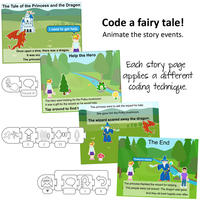
Teachers, are you looking for fun programming activities for beginners? In TechnoTales, primary students make a modern fairy tale. Coding with ScratchJr, they combine blocks to form scripts that animate the story action. The tale will be about a character that overcomes a problem by going on a quest. To live happily ever after, they must find a hidden item and locate someone that can help. What will happen in the “Once Upon a Time” adventure?
Stem Lesson Plans for Kids in Grades 1-3
Spark an interest in coding. The fun lessons introduce programming concepts to elementary students ages 6-8. Illustrated, step-by-step instructions explain how to build scripts to animate a fairy tale. Students learn how to divide a task into steps, sequence instructions, and debug code. In addition, they become aware of how conditional logic can be used to trigger actions. TechnoTales provides a foundation for students to master other programming languages in the future.
Imaginative Coding Resources
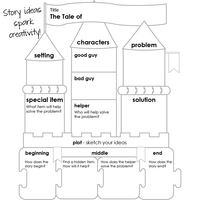
TechnoTales includes a digital Teacher Guide with lesson plans, learning objectives, teaching strategies, and more. Resources include a story organizer, offline coding exercises, assessment tools, videos, and ScratchJr flashcards.
Engage in Visual Storytelling with Programming Activities for Beginners
Teach programming concepts in a way that is fun, understandable, and meaningful for children. Integrate creative writing with coding. Students follow the writing process by first planning their tale. They select story elements including characters, setting, and plot. Next, they design unique pages that explain the events. Scripts are build to animate the action, and each student’s story is different. Then they use a checklist to review their work and make revisions. Finally, the story is shared with an audience.
Download ScratchJr for Free
Blend storytelling and coding with ScratchJr, a computer programming language that runs on iPads, Android tablets, and Chromebooks.
TechnoKids TechnoTales
- Publisher: TechnoKids
- Grade Level: 3-6
- Platform: Win
- Item #: JNR-TALES
We will honor all current TechnoKids promotions!
| Starter account. Includes online teacher 12 mths #JNR-TALES |
Price: $69.00 | |
| Class account: Teacher plus up 40 students 12 mths #JNR-TALESC |
Price: $129.00 |
Features and Benefits
The TechnoTales course has 21 assignments divided into six sessions.
Session 1: Get to Know ScratchJr
Students are introduced to programming with ScratchJr. To start, they explore the program window to learn about commonly used tools. Afterwards, they investigate the Triggering, Motion, Looks, Sound, Control, and End blocks to discover their function. Once familiar with the coding blocks they build simple scripts to create an animated scene.
Session 2: Once Upon a Time
Students begin to create their Techno Tale. Their modern fairy tale will be told by building scripts using coding blocks in ScratchJr. To gain inspiration they watch an example story and answer questions about the setting, characters, and plot. Next, they complete a planning sheet to organize their ideas. Students then design their first story page. It introduces the problem and shows the hero embarking on a quest to find a solution. Motion and Looks blocks are used to animate the action.
Session 3: Embark on a Quest
Students design another page in their Techno Tale. In this part of the story, the hero embarks on a quest. They travel in search of a special item. The reader will join in the hunt by tapping objects on the page. When the correct location is found, the item will reveal itself. Wait and Repeat blocks are used to control the timing of each action.
Session 4: Seek Help
Students create the third page in their Techno Tale. In this part of the story, the hero seeks help. If-then logic is used to control the animation. Scripts start only when characters bump into one another. This produces a fun sequence of events. First the hero asks for help. Then the helper goes after the villain. Finally, the bad guy does an action to show the problem is solved. To create this story page, students learn how to display the grid and count steps to direct movement.
Session 5: Happily Ever After
Students animate their final page in their Techno Tale. At the ending of the tale the characters live happily ever after. Broadcasting is used to organize the timing of events. This form of conditional logic directs scripts to start only when a message is received. It is used to trigger characters to do an action to celebrate the problem being solved.
Session 6: Story Time
Students share their Techno Tale. To prepare the project for viewers, a checklist is used to guide revisions. The story is then shown to friends and family. At the end of TechnoTales, the young coders reflect upon the learning experience.
Optional Programming Activities for Beginners
- The Tale of the Sad Fairy: Animate a simple scene.
- Record a Sound: Make a character talk or add sound effects.
- The Tale of the Runaway Horse: Explore fun ways to animate characters.
- How to Design a Character: Make a character using the Paint Editor.
- The Quest for the Fallen Star: Invent a game. Can the player find the star?
- Under Attack: Stop an alien invasion with coding blocks.
- Make Them Laugh: Send messages to tell funny jokes.
Videos
System Requirements
| Ages | 7, 8, 9, 10 |
|---|---|
| Grades | grade 2, grade 3, grade 4, grade 5 |
| Program | Scratch Jr |
| Tech Integration | computer science, language arts, math |
| Tech Skill | animation, coding |
| License | Homeschooling, Starter, Class, Classrooms, School |
| Starter License Includes | online teacher guide, online student workbook, get started, course slides, printable assessment tools, sample files, extension activities, certificates, parent letters |
| Classroom License Includes | online teacher guide, getting started tips, course calendar, class management tools, online student workbook, online assignments, printable assessment tools, online quizzes, student reporting, sample files, extension activities, certificates, parent letters, templates |
| Class License Includes | online teacher guide, getting started tips, course calendar, online student workbook, online assignments, printable assessment tools, online quizzes, student reporting, sample files, extension activities, certificates, parent letters, templates |
| Product Type | Course |
| Homeschool License Includes | Certificates, Extension activities, Online assignments, Online quizzes, Online teacher guide, Parent letters, Remove printable assessment tools, Sample files, Student reporting, Templates |