TechnoKids TechnoTrivia


Description
Learn how to create a quiz using either Google or Microsoft Forms. In TechnoTrivia, elementary and middle school students create a trivia game. To start, they formulate questions to test friends’ knowledge about a topic. Next, they set the answer key to build an automated system that calculates points and sends quiz results. At the end of the curriculum unit, they share their game with friends.
You can integrate the TechnoTrivia project into any curriculum area. Or hook student interest by having them select a topic of personal expertise. The lessons are ideal for Grade 4 and up.
Integrate Google or Microsoft Forms Into Curriculum
Blend TechnoTrivia into any subject area as a discovery tool, review activity, or to share personal interests or expertise. Students devise a plan, generate thought provoking questions, make an answer key with feedback, and invite peers to play the trivia game. Finally, they analyze scores and reflect on their learning.
Step-by-Step Instructions to Make a Trivia Game
TechnoTrivia includes a Teacher Guide with lesson plans, teaching strategies, and assessment tools. Optional Extension Activities are provided for extra challenges.
Shake Up Your Computer Curriculum With a One-of-a-Kind Project
A unique trivia forms quiz adds excitement and variety to a technology program. Break up keyboarding classes with a fun and stimulating activity. Students build all-new skills using Google Forms or Microsoft Forms. Develop vital learning objectives such as planning & organizing, researching to fact-check, devising credible incorrect answers, considering suitable point value, providing helpful feedback, and analyzing results.
Students as Content Producers
Unleash young learners’ creative potential. Tech-savvy students are actively engaged when they construct their own interactive projects. Creating a trivia quiz to share with friends is a powerful hook.
Create a Quiz to Promote Collaboration
Students test, share, comment, and study results. They consider audience viewpoint in developing quiz questions. Improve written & oral communication skills, build self-esteem, cultivate positive relationships, and learn constructive criticism.
TechnoKids TechnoTrivia
- Publisher: TechnoKids
- Grade Level: 3-6
- Platform: Win
- Item #: JNR-TRIVIA
We will honor all current TechnoKids promotions!
| Starter account. Includes online teacher 12 mths #JNR-TRIVIA |
Price: $49.00 | |
| Class account: Teacher plus up 40 students 12 mths #JNR-TRIVIAC |
Price: $109.00 |
Features and Benefits
Session 1: Test Your Wits
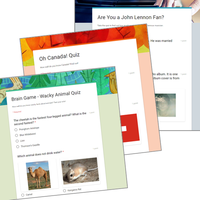
Students test their wits. To jump start the fun, they are introduced to trivia quizzes by completing the Wacky Animal Quiz. Once familiar with the structure and purpose of this type of game, students rate their quizmaster type. Get ready to entertain friends and family with odd, silly, and interesting questions.
Session 2: Build a My Country Quiz
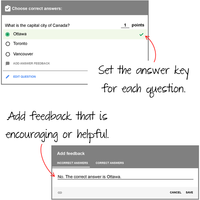
Students build a trivia quiz about their country. It will test knowledge about the capital city, flag, landmarks, facts, and national symbols. Students will learn how to pose questions, set the point value, and create an answer key. This activity provides an understanding of Google or Microsoft Forms features and the structure of a quiz.
Session 3: Plan Your Trivia Quiz
Students become quizmasters. They design a trivia quiz for their family and friends to play. To start, they brainstorm topic ideas. Once they have selected a theme, they formulate a plan. An organizer is used to record the questions, correct answers, and points. Students apply helpful tips to generate thought-provoking questions.
Session 4: Design a Trivia Quiz
Students build their trivia quiz using Google or Microsoft Forms. They follow their plan to create the questions, scoring system, and answer key. Upon completion, the quizmasters conduct tests to verify the game is working properly. They then assess the quality of the trivia quiz using a checklist to highlight areas for improvement.
Session 5: Host a Trivia Time Event
Students take part in a Trivia Time Event. Students invite others to take their quiz. They then test their knowledge by taking quizzes made by classmates. Who is a know-it-all?
Session 6: Study Trivia Responses
Students analyze players' answers to the trivia quiz. Using Google or Microsoft Forms, they view a summary of responses. Graphs for each question illustrate the items that players found easy and difficult. Based on their evaluation, they make recommendations on how to change the trivia quiz to make it even better.
Optional Fun Trivia Forms Quiz Activities
- Make the Quiz a Battle of the Brains: Sort spreadsheet data. Declare a champion.
- Collaborate to Build a Trivia Game: Each member builds questions for a category.
- Create a Pick Your Own Ending Story: Use a quiz to make a story with optional endings.
- Ask a Question About a Video Clip: Test people's observation or listening skills with a video.
- Ask a Short Answer Question: Ask an open ended opinion question.
- Visit Quiz Central: 7 Fun quizzes to try. Analyze the questions.
- Customize the Theme Header: Add a saved picture file to the quiz banner. (Google Forms only)
Videos
System Requirements
| Ages | 9, 10, 11, 12, 13, 14, 15, 16, 17 |
|---|---|
| Grades | grade 4, grade 5, grade 6, grade 7, grade 8, grade 9, grade 10, grade 11, grade 12 |
| Program | Excel, Forms, Sheets |
| Tech Integration | geography, history, language arts, math, science, social studies |
| Tech Skill | data analysis |
| License | Homeschooling, Starter, Class, Classrooms, School |
| Starter License Includes | online teacher guide, online student workbook, get started, printable assessment tools, sample files, templates, extension activities, certificates, parent letters |
| Class License Includes | online teacher guide, getting started tips, course calendar, online student workbook, online assignments, printable assessment tools, online quizzes, student reporting, sample files, extension activities, certificates, parent letters |
| Classroom License Includes | online teacher guide, getting started tips, course calendar, class management tools, online student workbook, online assignments, printable assessment tools, online quizzes, student reporting, sample files, extension activities, certificates, parent letters |
| Product Type | Course |
| Homeschool License Includes | Certificates, Extension activities, Online assignments, Online quizzes, Online teacher guide, Parent letters, Remove printable assessment tools, Sample files, Student reporting, Templates |