
TechnoKids TechnoWhiz


Description
Coding for Kids
Make coding for kids accessible and fun. Embark on a coding journey with TechnoWhiz. The course is specially designed for kids aged 6-8. In this exciting introduction to programming, students dive into Scratch Jr. They learn the fundamentals of coding through playful activities. Unleash the imagination. Animate silly scenes, feed pet monsters, explore magical lands, and even race to the finish line. Invite curious young minds to become whiz kids!
Fun-Filled Introduction to Programming
Discover the basics of coding through step-by-step Scratch Jr lessons. Activities are tailored for primary and elementary students in Grades 1-3. By snapping together graphical programming blocks, students build simple scripts and loops. They develop essential computational thinking skills along the way. From creating animations to designing games, the possibilities are endless.
Scratch Jr Coding for Beginners
TechnoWhiz comes complete with a digital Teacher Guide, ensuring that educators can easily navigate coding lessons. The course includes offline coding exercises, assessment tools, videos, and Scratch Jr flashcards.
A Multidisciplinary Approach
Integrate coding into various subjects with a cross-curricular unit. Encourage visual storytelling by designing exciting scenes with characters, setting, and plot. Apply mapping skills by giving directions to move objects from one point to another. Strengthen mathematical reasoning through Scratch Jr coding lessons that foster problem-solving skills in a motivating context.
Free Access to ScratchJr
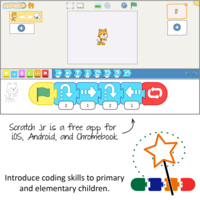
Take advantage of ScratchJr, a user-friendly computer program available for free on iPads, Android tablets, and Chromebooks. This accessibility ensures that coding adventures can take place anywhere, making learning engaging and flexible for students.
TechnoKids TechnoWhiz
- Publisher: TechnoKids
- Grade Level: 1-3
- Platform: Win
- Item #: PRI-WHIZ
We will honor all current TechnoKids promotions!
| Starter account. Includes online teacher 12 mths #PRI-WHIZ |
Price: $69.00 | |
| Class account: Teacher plus up 40 students 12 mths #PRI-WHIZC |
Price: $129.00 |
Features and Benefits
The TechnoWhiz course has 16 assignments divided into six sessions.
Session 1: Become a Whiz Kid
Students become programming whiz kids. Their first assignment is to sequence a series of tasks to learn about the job of a programmer. Next, they open Scratch Jr to investigate the function of many of the tools. By adding Motion blocks to the programming area, they learn how to code a character's movement. Next, they connect blocks together to form a script that sequences actions. Finally, students cause the script to loop. At the end of the session, they combine their coding skills to create a silly scene. It comes to life by combining a colorful background with moving characters.
Session 2: Count and Code
The programming whiz kids take the Counting Challenge. They learn to direct how many steps a character moves to reach a goal. To start, they solve puzzles to help the cat eat the cake, the dog get the ball, and the horse reach the barn. Next, they explore how to edit the Motion coding blocks to set the number of steps. Once they have mastered this skill, students build scripts to help characters get home. Can they do it?
Session 3: Create a Pet Monster Game
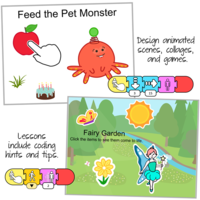
The programming whiz kids design a game. They build code that has a player feed a pet monster. To start, they create an opening sequence to attract attention. It has the character talk, grow, shrink, and blink. The action is controlled using the Wait and Repeat blocks. Afterwards, students apply their knowledge to add food to the stage that when clicked moves to the pet monster and then disappears. What does the pet monster like to eat?
Session 4: Design a Magical Land
The programming whiz kids design an interactive magical land. The game invites players to explore the place to discover surprises. By clicking on objects, they will cause flowers to grow, a sun to spin, or dragons to hop. The speed of the action is controlled to make it happen slow or fast. What amazing things are hidden in the scene?
Session 5: Race to the Finish
The programming whiz kids build a racing game. Players watch the action and then must select the winner. If they pick correctly, the racer will do a celebration dance. Who will reach the finish line first?
Session 6: Game Time
The programming whiz kids invite others to play their racing game. Players rate what they liked the most about the activity. Afterwards, the young game designers answer questions about coding the Scratch Jr project.
Optional Scratch Coding Lessons
- X Marks the Spot: Control movement to design a treasure hunt.
- Move Around Town Game: Practice controlling directions on a grid with an offline activity.
- Be a Gamer: Play a game to provide feedback.
- In the Jungle: Design a game in which the player makes the jungle come to life.
- Invent a Far Away Planet: Create the Planet of Twin. One twin moves fast, the other slow.
- Hop to the Top: Code a hopping match that has the player identify the champ.
- Paint a Background: Apply paint tools to edit or create a backdrop
- I am a Programmer: Reflect upon the coding experience.
Videos
System Requirements
| Ages | 6, 7, 8 |
|---|---|
| Grades | grade 1, grade 2, grade 3 |
| Program | Scratch Jr |
| Tech Integration | computer science, language arts, math, social studies, visual arts |
| Tech Skill | animation, coding, game development |
| License | Homeschooling, Starter, Class, Classrooms, School |
| Starter License Includes | online teacher guide, online student workbook, get started, course slides, printable assessment tools, sample files, templates, extension activities, certificates, parent letters |
| Class License Includes | online teacher guide, getting started tips, course calendar, online student workbook, online assignments, printable assessment tools, online quizzes, student reporting, sample files, extension activities, certificates, parent letters, templates |
| Classroom License Includes | online teacher guide, getting started tips, course calendar, class management tools, online student workbook, online assignments, printable assessment tools, online quizzes, student reporting, sample files, extension activities, certificates, parent letters, templates |
| Product Type | Course |
| Homeschool License Includes | Certificates, Extension activities, Online assignments, Online quizzes, Online teacher guide, Parent letters, Remove printable assessment tools, Sample files, Student reporting, Templates |