
TechnoKids TechnoWonderland


Description
Microsoft Office Lessons for Middle and High School
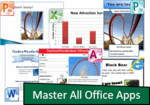
Engage middle and high school students with Microsoft Office lessons that simulate the real world. In TechnoWonderland, students become marketing executives for an amusement park. This challenging job has them use Microsoft Office to complete a wide range of job duties.
The course begins with students creating a poster in Microsoft Word that advertises the thrilling rides and spectacular shows that guests can experience. The fun continues, as teens conduct Internet research for an animal exhibit to develop placards for the enclosure. Their next task involves selecting a new attraction by graphing survey data using Microsoft Excel. Students then promote this exciting new addition by creating a video using Microsoft PowerPoint. To generate a buzz about the new attraction, season ticket holders receive an invitation to an exclusive event, created using Microsoft Publisher. With the year ending, students analyze data using a Microsoft Access database to improve customer satisfaction.
Project-Based Learning is Fun
Unique and innovative project-based middle and high school activities to integrate word processing, spreadsheet, presentation, database skills, and more! Students play the role of an executive working at an amusement park. They create a variety of documents – an advertising poster, customer survey, animated billboard, and more.
Authentic, Real-World Challenges
Hook student interest with relevant, meaningful tasks. Promote active learning as teens and tweens solve everyday problems.
Promote STEM, CTE, and ICT
Build a foundation in technology skills that will be vital for career readiness. Prepare students for the jobs of tomorrow by developing many essential competencies in one comprehensive project. This Microsoft Office project encourages tech-savvy young people to extend their computer expertise.
Classroom Tested Microsoft Office Project
Teacher Guide lists preparation strategies, lesson plans, tips and tricks, and skill summaries. Customizable marking sheets are included for each activity. Samples, templates, and checklists help students develop organizational skills and creativity.
TechnoKids TechnoWonderland
- Publisher: TechnoKids
- Grade Level: 7-12
- Platform: Win
- Item #: SNR-WONDERLAND
We will honor all current TechnoKids promotions!
| Starter account. Includes online teacher #SNR-WONDERLAND |
Price: $49.00 | |
| Class account: Teacher plus up 40 students #SNR-WONDERLANDC |
Price: $109.00 |
Features and Benefits
The TechnoWonderland course has 24 assignments divided into six sessions.
Session 1: Create an Amusement Park
Students create an amusement park. To start, they select the thrill rides, exhibits, shows, and other services available to guests. Once a plan has been developed, they use Microsoft Word to promote this exciting tourist attraction. Using text, clip art, pictures, and more, students develop the word processing skills necessary to create an attention-grabbing poster.
Session 2: Research an Animal Exhibit
Students conduct Internet research to prepare placards for an animal exhibit. To start, they are introduced to basic search strategies. They apply these skills to locate facts about the animal that visitors will find interesting. Afterwards, students expand their word processing skills to create information signs using Microsoft Word that are posted around the attraction. They learn how to adjust page orientation, set the margin, apply a page border, and more!
Session 3: Survey a New Attraction
Students must develop a solution to increase visitor traffic. Conduct a survey to learn about the types of attractions that appeal to a particular age group. Organize the data in a worksheet and chart the results using Microsoft Excel. Afterwards, analyze the information to determine what needs to be added to the amusement park to attract a particular visitor.
Session 4: Advertise a New Attraction
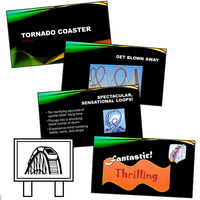
Students create a video advertisement to publicize an attraction. This marketing promotion will run on electronic billboards throughout the park. Using Microsoft PowerPoint, students create a series of eye-catching slides using text boxes, pictures, and WordArt. Transitions and simple animation are applied to the presentation. Upon completion, the advertisement is saved as a video.
Session 5: Invite Guests to an Event
Students invite guests to the opening of an exciting new attraction. Only amusement park season ticket holders can attend this exclusive event. Using Microsoft Publisher, students create an invitation that encourages people to visit the park and join in the celebration.
Session 6: Analyze Amusement Park Data
Students examine amusement park data. To start, they are introduced to Microsoft Access and database terminology. Afterwards, they view a summary of the attractions available to guests. By filtering the records, students learn about the popularity of rides, aging exhibits, and location of essential services. Once familiar with how to use a database, they enter a record of the latest addition to the park.
Optional Microsoft Office Lessons
- Amusement Park Map: Use symbols and text to make a park map.
- View the Animal Exhibit: Design a poster with SmartArt graphics.
- Park Attractions Photo Album: Use PowerPoint to create a photo album.
- Analyze Visitor Traffic: Calculate and graph with formulas.
- Amusement Park Sign: Use Word to create a sign.
- Make a Voucher: Use Publisher to design a coupon.
- Generate a Calendar: Create a calendar using Publisher.
- Use a Query to Report Height Restrictions: Generate a query and a report.
Videos

System Requirements
| Ages | 12, 13, 14, 15, 16, 17, 18 |
|---|---|
| Grades | grade 7, grade 8, grade 9, grade 10, grade 11, grade 12 |
| Program | Access, Excel, PowerPoint, Publisher, Word |
| Tech Integration | business studies, language arts, math, visual arts |
| Tech Skill | data analysis, graphics, internet, presentation, publishing, spreadsheet, word processing |
| License | Homeschooling, Starter, Class, Classrooms, School |
| Starter License Includes | online teacher guide, online student workbook, get started, printable assessment tools, sample files, templates, extension activities, certificates, parent letters |
| Class License Includes | online teacher guide, getting started tips, course calendar, online student workbook, online assignments, printable assessment tools, online quizzes, student reporting, sample files, extension activities, certificates, parent letters, templates |
| Classroom License Includes | online teacher guide, getting started tips, course calendar, class management tools, online student workbook, online assignments, printable assessment tools, online quizzes, student reporting, sample files, extension activities, certificates, parent letters, templates |
| Product Type | Course |
| Homeschool License Includes | Certificates, Extension activities, Online assignments, Online quizzes, Online teacher guide, Parent letters, Remove printable assessment tools, Sample files, Student reporting, Templates |