
TechnoKids TechnoTimeline

Description
Unique Timeline Lesson Plan for Kids
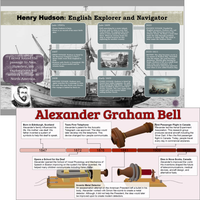
Capture student interest with a one-of-a-kind timeline lesson plan. In TechnoTimeline, students aged 8-11 use Google Slides or PowerPoint to create timelines explaining significant events. With this versatile activity, students organize information in chronological order. Use the lessons to identify important events, understand historical periods, study changes over time, or analyze causal relationships. Seamlessly integrate technology with history, geography, or social studies.
Hook Student Interest
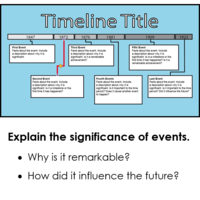
Elevate student engagement with an innovative technology project. Students use presentation software to explain the significance of a remarkable person, time period, or event of their choice.
Timeline Course: Integrate Social Studies and Computers
Foster an interest in history while enhancing critical thinking skills. Students delve into studying a significant milestone or notable figure. Then they plan and organize research findings, assess salient facts, and present them in a graphic organizer within a slide show timeline. Teaching this activity helps students connect historical events, note their significance, and understand chronological information through visual displays.
Build Essential STEM Skills with Graphic Organizers
Develop key technology skills for future careers. Teach computer, curriculum, and personal skills all in one fun project. Students learn advanced presentation skills, engage in the inquiry process, and cultivate core soft skills such as communication, organization, problem-solving, and self-confidence.
Complete Digital Resources for Teachers of Grades 3-6
TechnoTimeline includes everything you need: Teacher Guide, summary of skills, checklists, assessment tools, templates, and a variety of samples to inspire and motivate young learners.
TechnoKids TechnoTimeline
- Publisher: TechnoKids
- Grade Level: 3-6
- Platform: Win
- Item #: JNR-TIMELINE
We will honor all current TechnoKids promotions!
| Starter account. Includes online teacher 12 mths #JNR-TIMELINE |
Price: $49.00 | |
| Class account: Teacher plus up 40 students 12 mths #JNR-TIMELINEC |
Price: $109.00 |
Features and Benefits
Assignment 1 What is a Timeline?
Examine timelines to gain an understanding of how a graphic organizer summarizes key events.
Assignment 2 Brainstorm a Topic
Formulate a plan for building a timeline. Select a timeline type and determine a topic.
Assignment 3 Organize Research Findings
Research significant events. Organize findings in a document.
Assignment 4 Start to Make the Timeline Slide
Customize a slide for a timeline. Set the slide size, layout, and theme. Apply a slide background.
Assignment 5 Organize Events using SmartArt/Objects
Customize a slide for a timeline. Set the slide size, layout, and theme. Apply a slide background.
Assignment 6 Highlight Events in the Timeline
Emphasize a critical moment or turning point. Illustrate timeline events using pictures.
Assignment 7 Use a Checklist to Edit the Timeline
Self-evaluate the timeline using a checklist. Revise the content and design.
Assignment 8 Share Timeline to Get Feedback
Peer review a friend's timeline. Comment to offer feedback. Use suggestions to improve timeline.
Assignment 9 Share Timeline with Others
Celebrate a historical period. Print the timeline or present information to an audience.
Optional Timeline Lesson Plan Activities
- Is it Significant? Learn to judge the importance of events.
- Drawing Workshop: Practice drawing and formatting shapes.
- Highlight Events using Saved Images: Use design tips to work with images.
- Zoomable Timeline: Zoom to learn about a special event. (PowerPoint 2016)
NOTE: Assignment titles and sequence vary slightly between the Microsoft and Google versions. Select extension activities may not be available for all product versions.
Videos
System Requirements
| Ages | 8, 9, 10, 11, 12, 13, 14, 15, 16, 17 |
|---|---|
| Grades | grade 3, grade 4, grade 5, grade 6, grade 7, grade 8, grade 9, grade 10, grade 11, grade 12 |
| Program | Docs, Slides, PowerPoint, Word |
| Tech Integration | geography, history, social studies |
| Tech Skill | graphics, presentation, word processing |
| License | Homeschooling, Starter, Class, Classrooms, School |
| Starter License Includes | online teacher guide, online student workbook, get started, printable assessment tools, sample files, templates, extension activities, certificates, parent letters |
| Class License Includes | online teacher guide, getting started tips, course calendar, online student workbook, online assignments, printable assessment tools, online quizzes, student reporting, sample files, extension activities, certificates, parent letters, templates |
| Classroom License Includes | online teacher guide, getting started tips, course calendar, class management tools, online student workbook, online assignments, printable assessment tools, online quizzes, student reporting, sample files, extension activities, certificates, parent letters, templates |
| Product Type | Course |
| Homeschool License Includes | Certificates, Extension activities, Online assignments, Online quizzes, Online teacher guide, Parent letters, Remove printable assessment tools, Sample files, Student reporting, Templates |